
By default, GrabrFi can send verification codes or one-time passwords (OTPs) to your WhatsApp account. If you prefer to receive codes only via push notification or SMS, you can turn off WhatsApp delivery in your settings.
How to turn off WhatsApp delivery
Open the GrabrFi app.
Go to More.
Select Settings
Tap Two-factor authentication.
Tap WhatsApp.
Confirm that you want to disable it.
The status will change from Active to Disabled.
You can also go directly to your two-factor authentication settings.
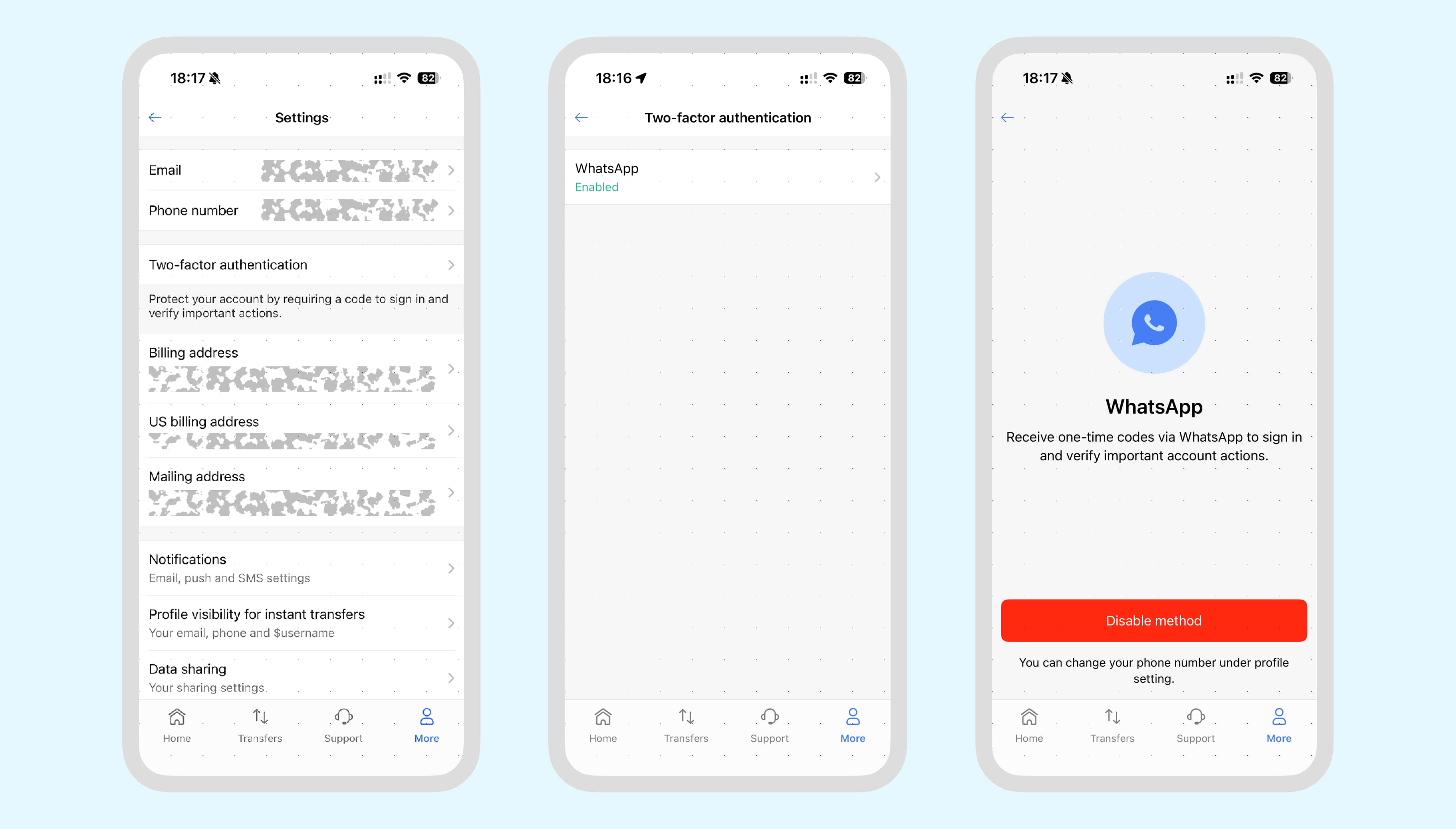
What happens when WhatsApp is disabled
Once WhatsApp delivery is disabled:
If you're logged in on a mobile device with push notifications enabled, you'll continue to receive codes via push notification.
When push is not available (for example, when logging in on a new device), you'll receive codes via SMS instead of WhatsApp.
Can I turn WhatsApp back on?
Yes. Go to More → Settings → Two-factor authentication → WhatsApp and re-enable it. The status will change back to Active.
Why does GrabrFi use WhatsApp?
WhatsApp delivery is more reliable than SMS in many regions, especially for users outside the United States. It does not depend on mobile carrier availability and works over any internet connection (Wi-Fi or mobile data), which makes it a good fit for international users.